Interface map
Every persistent control in a Py Editor project window, and where it lives.
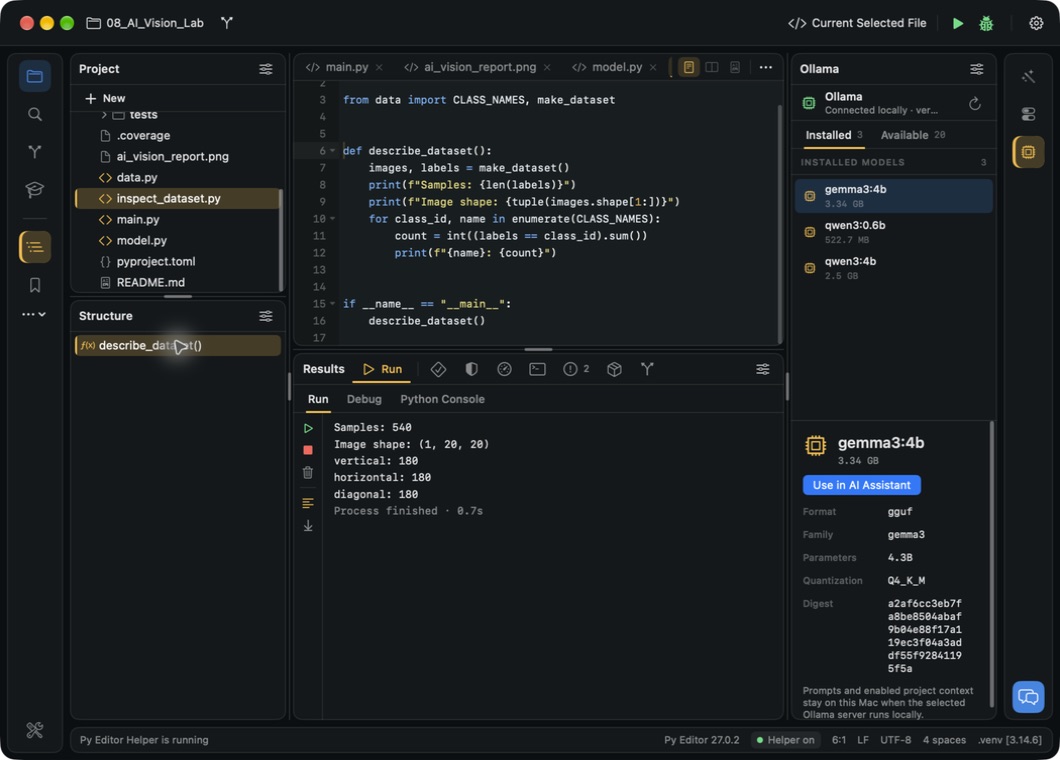 Open the screenshot to view it at full size.
Window zones
A project window is laid out in four bands: the toolbar row, then the left rail and left panels beside the main area and the right column and right rail, then the Results dock, then the status bar.
| Zone | Contains |
|---|---|
| Toolbar row | Project chip, Git chip, run-configuration chip, Run, Debug, Application Settings |
| Left rail | Buttons for the left panels, More Tool Windows, Project Settings |
| Left panel | One upper panel and one lower panel, chosen from the rail |
| Main area | Editor tab bar and the editor, preview or diff surface |
| Results | The bottom dock: Run, Debug, Python Console, Tests, Coverage, Profiler, Terminal, Problems, Packages, Git log |
| Right column | AI Assistant, Services or Ollama |
| Right rail | Buttons for the right column, plus Product Feedback |
| Status bar | Current activity, version, Helper state, cursor and file facts, interpreter |
Toolbar row
| Control | What it does |
|---|---|
| Project chip (project name) | Opens the project actions menu |
| Git chip (branch name; gold dot when the working tree is dirty) | Opens the Git actions menu. Shows an icon only when the folder is not a repository |
| Run-configuration chip | Selects the active run configuration |
| ▶ / ■ | Runs the active configuration, or stops the running one |
| Ladybug | Opens Debug and starts the debugger. Needs Helper |
| Gear | Opens Application Settings |
Project chip menu
Project Settings… · Show Project Tool Window · Open Project… · Clone Repository… · New Python Project… (shows the launcher) · Reveal in Finder · a Recent Projects section with up to six projects.
Git chip menu
Switch Branch ▸ · Merge Branch ▸ · New Branch… · Fetch · Pull · Pull with Rebase (these need Helper 0.5.0 or later) · Abort Merge / Abort Rebase during a conflict · Working Tree… · Commit… · Git Log · Copy Repository URL · Push… · Refresh Git Status · Create Local Git Repository… when the folder is not yet a repository.
Run-configuration chip menu
Current Selected File · each saved configuration · Run in Python Console (needs Helper) · Edit Configurations… · Stop while something is running.
Left rail
| Button | Panel |
|---|---|
| Top group | Project, Find, Commit, Learn |
| Bottom group | Structure, Bookmarks |
| … | More Tool Windows |
| Wrench | Project Settings |
A rail button is gold while its panel has focus and blue while it is open. Clicking a bottom-group button again collapses the lower slot.
The More Tool Windows menu contains Left Panels ▸, Results Panels ▸, Right Panels ▸, and Configure Visible Tool Windows ▸, which has one checkmark per panel plus Restore All 16 Panels. Project cannot be hidden.
Each left panel header carries a Manage panel menu with Collapse All (Project only), Open in Window / Dock in Workspace, Minimize and Remove from Toolbar. The Project panel adds New; the Commit panel adds Refresh, or Set up Helper when Helper is missing; the Learn panel adds a book icon that opens the Python book.
Panels
| Panel | Where | Main controls |
|---|---|---|
| Project | Left rail, top | File tree, New, per-row context menu |
| Find | Left rail, top | Find in project, Show Replace / Hide Replace, Replace with, Replace, All |
| Commit | Left rail, top | Include all changed files, per-file Include in commit, Commit Message, Amend, Push, Commit. Needs Helper |
| Learn | Left rail, top | Python Basics course with Continue and Mark complete, Using Py Editor guide cards, Example Scripts |
| Structure | Left rail, bottom | Symbols in the selected file |
| Bookmarks | Left rail, bottom | Add bookmark, Breakpoint (Python files), per-row remove |
| Run | Results | Program output; Enter input, Send and Stop while a program runs |
| Debug | Results | Call stack, Locals, Evaluate expression with Evaluate. Needs Helper |
| Python Console | Results | Target context, variables pane with filters All, Locals, Globals, Values, Functions, Search variables, Edit Value…. Needs Helper |
| Terminal | Results | An interactive shell in the project folder. Needs Helper |
| Problems | Results | Analyze Now / Analyze Again, Try Again, Open Run |
| Tests | Results | Results and Raw output tabs, Run, Rerun Failed |
| Coverage | Results | Report and Raw output tabs, Run, Show Coverage in Editor (native editor engine only) |
| Profiler | Results | Call statistics and Raw output tabs, Run, Search functions or files, Project files only, sort by Cumulative, Self time or Calls. Needs Helper |
| Packages | Results | Search PyPI packages, Search, PyPI Results and Installed tabs, a … menu with From Disk…, From Git / VCS… and Package Sources…. Needs Helper to install |
| Git log | Results | Commit history and the changes of the selected commit. Needs Helper |
| Services | Right column | Docker Containers, Images, Networks, Volumes; a CLOUD section for Google Cloud, Amazon Web Services and Microsoft Azure. Needs Helper |
| Ollama | Right column | Installed and Available tabs, Download, Use in AI Assistant |
| AI Assistant | Right column | Provider, model and mode chips, Ask about Python or this project, Send, Stop |
Editor tab bar
| Control | What it does |
|---|---|
| File tab | Selects the file. A gold dot marks unsaved changes |
| Tab × | Closes the tab |
| View-mode switcher | Editor only ⌃⌘1, Editor and preview ⌃⌘2, Preview only ⌃⌘3 |
| Compare icon | Opens the working-tree diff. Shown only when the file has Git changes |
| … | The three view modes plus Close All Tabs |
The preview modes are available for .md, .markdown, .html, .htm, .svg
and .ipynb files. A tab's context menu offers Show Local History and
Close Tab. With no file open the main area shows the welcome view with
Create New File and Select Folder.
Results
The dock header reads Results and carries icon tabs for Run (a group), Tests, Coverage, Profiler, Terminal, Problems (with a badge showing the problem count), Packages and Git log. Inside the Run group, sub-tabs switch between Run, Debug and Python Console. Services and Ollama appear only in the right column.
Each surface has its own gutter of buttons:
| Surface | Gutter buttons |
|---|---|
| Run | Run active configuration · Stop · Clear output · Soft wrap · Scroll to end |
| Debug | Start or restart debugger · Toggle breakpoint at cursor · Show breakpoints · Continue · Step into · Step over · Step out · Quit debugger · Clear debugger output |
| Python Console | Run active configuration in Python Console · Refresh variables · New Python Console · Interrupt · Stop Python Console · Clear console output · Soft wrap |
| Terminal | New session · Interrupt · Soft wrap |
| Problems | Reanalyse |
| Tests | Run tests · Stop |
| Coverage | Run coverage · Stop |
| Profiler | Profile active configuration · Stop · Clear profiler results |
| Packages | Refresh |
| Git log | Refresh history |
Surfaces that need Helper — Debug, Python Console, Terminal, Profiler, Packages, Services and Git log — show Set Up Helper… and Check Again until Helper is connected.
Right rail
| Button | What it does |
|---|---|
| Wand | Shows AI Assistant in the right column |
| Switch | Shows Services. Needs Helper |
| Chip | Shows Ollama |
| Speech bubble (bottom) | Opens Product Feedback |
Status bar
| Item | What it shows or does |
|---|---|
| Message | The current activity, or the last action status. Opens Run results while a program is running |
| ^ Results | Reopens the Results dock. Shown only while the dock is hidden |
| Py Editor ‹version› | The version and build number |
| Helper on / Helper off | Opens Py Editor Helper setup |
| line:column | The cursor position |
| Line endings | The line-ending style of the file |
| UTF-8 | The document encoding |
| n spaces / n tabs | The indentation of the file |
| Interpreter summary | The project environment and its Python version. Gold while the environment has not been created. Opens the Interpreter tab of Project Settings, Helper setup, or environment preparation, depending on the state |
Project launcher
The Welcome to Py Editor window opens at launch and from File → Show Project Launcher.
| Element | What it does |
|---|---|
| Search a workspace, or type a path… | Filters the project list. ⌘K focuses it; ↑, ↓ and Return move through the results |
| New Python Project | Creates a project folder with main.py and pyproject.toml |
| Clone Repository | Clones a Git repository into a folder you choose |
| Open Project ⌘O | Opens an existing folder as a project |
| RECENTLY OPENED list | Opens a project. Its context menu offers Remove from Projects |
Detached windows
Manage panel → Open in Window moves a panel into its own window; Dock in Workspace returns it. Left panels open at 360 × 520 points and Results panels at 760 × 420 points.